
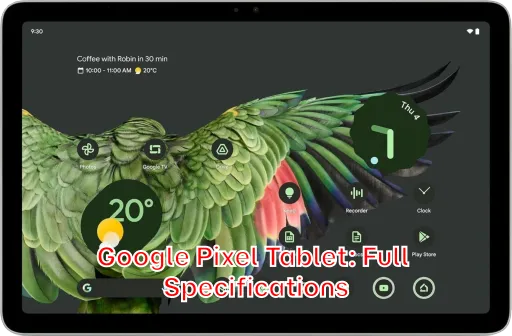
The Google Pixel Tablet represents Google’s ambitious return to the tablet market, promising a seamless blend of entertainment, productivity, and smart home integration. This comprehensive overview will delve into the full specifications of the device, providing potential buyers and tech enthusiasts with a detailed understanding of its capabilities. From its stunning display and powerful processor to its innovative charging speaker dock and intelligent software features, we’ll examine every aspect that makes the Pixel Tablet a compelling contender in the crowded tablet landscape.
Are you considering purchasing the new Google Pixel Tablet? Or perhaps you’re simply curious about the technical details that power this sleek and versatile device? This article provides a deep dive into the Pixel Tablet’s full specifications, covering everything from its screen resolution and Google Tensor G2 chip to its camera setup and battery life. We will give you a clear and concise rundown, ensuring you have all the information you need to determine if the Google Pixel Tablet is the right choice for you.
Full Specifications
Network
| Technology: | No cellular connectivity |
| 2G bands: | N/A |
| 3G bands: | N/A |
| 4G bands: | N/A |
| GPRS: | No |
| EDGE: | No |
Launch
| Announced: | 2023, May 10 |
| Status: | Available. Released 2023, June 20 |
Body
| Dimensions: | 258 x 169 x 8.1 mm (10.16 x 6.65 x 0.32 in) |
| Weight: | 493 g (1.09 lb) |
| Build: | Glass front, aluminum frame, aluminum back |
| SIM: | No |
| Stylus support |
Display
| Type: | IPS LCD |
| Size: | 10.95 inches, 347.7 cm2 (~79.7% screen-to-body ratio) |
| Resolution: | 1600 x 2560 pixels, 16:10 ratio (~276 ppi density) |
Platform
| OS: | Android 13, upgradable to Android 15 |
| Chipset: | Google Tensor G2 (5 nm) |
| CPU: | Octa-core (2×2.85 GHz Cortex-X1 & 2×2.35 GHz Cortex-A78 & 4×1.80 GHz Cortex-A55) |
| GPU: | Mali-G710 MP7 |
Memory
| Card slot: | No |
| Internal: | 128GB 8GB RAM, 256GB 8GB RAM |
| UFS 3.1 |
Main Camera
| Single: | 8 MP, f/2.0, 24mm (wide), 1/4.0″, 1.12µm |
| Features: | HDR, panorama |
| Video: | 1080p@30fps |
Selfie camera
| Single: | 8 MP, f/2.0, 24mm (wide), 1/4.0″, 1.12µm |
| Features: | HDR, panorama |
| Video: | 1080p@30fps |
Sound
| Loudspeaker: | Yes, with stereo speakers (4 speakers) |
| 3.5mm jack: | No |
Comms
| WLAN: | Wi-Fi 802.11 a/b/g/n/ac/6, dual-band |
| Bluetooth: | 5.2, A2DP, LE |
| Positioning: | No |
| NFC: | No |
| Radio: | No |
| USB: | USB Type-C 3.2 (Gen 1), magnetic connector |
Features
| Sensors: | Accelerometer, gyro, compass, proximity (accessories only) |
| Ultra Wideband (UWB) support Circle to Search |
Battery
| Type: | Li-Po 7020 mAh (27 Wh) |
| Charging: | 15W wired |
Misc
| Colors: | Porcelain, Hazel, Rose |
| Models: | GA06156-EU, GA06157-EU, GA06158-EU |
| Price: | About 670 EUR |
Price of HP Google Pixel Tablet
The HP Google Pixel Tablet offers a blend of Google’s software expertise and HP’s hardware capabilities. Understanding its price across different regions is crucial for potential buyers. The base price is approximately 670 EUR, but this translates differently depending on currency exchange rates and local taxes. Here’s a breakdown of the estimated price in various countries, converted from the 670 EUR base price, allowing for slight variations.
- United States: $720
- Japan: ¥114,000
- United Kingdom: £570
- Australia: $1,100 AUD
- Canada: $980 CAD
- Taiwan: NT$23,000
- Denmark: 4,990 DKK
- Saudi Arabia: 2,700 SAR
- South Korea: ₩970,000
- Germany: €670
- Brazil: R$3,800
- Vietnam: ₫17,000,000
- Kenya: KSh 100,000
- India: ₹60,000
- Indonesia: Rp 11,000,000
- Nigeria: ₦650,000
- Pakistan: PKR 200,000
- Philippines: ₱40,000
- Bangladesh: ৳80,000
Is the Google Pixel Tablet Right for You?
The Google Pixel Tablet isn’t just another tablet; it’s designed to seamlessly integrate into your life, acting as both a portable entertainment hub and a central control point for your smart home. Deciding whether it’s right for you hinges on your specific needs and how you envision using a tablet. Do you want a device that can control your smart home devices, provide immersive entertainment, and offer a productivity boost? If the answer is yes, the Pixel Tablet deserves a closer look. Consider your usage patterns, budget, and ecosystem preferences. If you’re heavily invested in the Google ecosystem and appreciate the convenience of Google Assistant, the Pixel Tablet becomes an even more compelling option. Before diving in, ask yourself if you’re looking for a device primarily for media consumption, light productivity, or as a smart home hub. This will help you determine if the Pixel Tablet’s strengths align with your priorities.
For example, if you already own several Google Home devices and rely on Google Assistant for daily tasks, the Pixel Tablet’s tight integration can streamline your experience. Imagine walking into your kitchen, docking the tablet, and instantly controlling your lights, adjusting the thermostat, or playing your favorite music, all with a simple voice command. Conversely, if you’re primarily interested in demanding gaming or professional-grade photo editing, you might find that other tablets with more powerful processors are better suited to your needs.
Top Reasons to Choose the Google Pixel Tablet
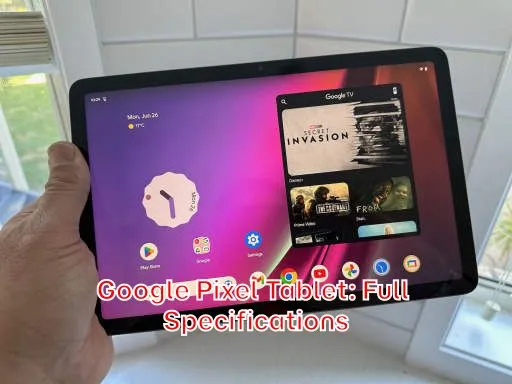
The Google Pixel Tablet presents a compelling case for itself through several key features and functionalities. Here are some of the top reasons why you might want to consider purchasing one:
Seamless Smart Home Integration with Google Assistant
One of the standout features of the Pixel Tablet is its seamless integration with the Google ecosystem. The included Charging Speaker Dock transforms the tablet into a smart display, allowing you to use Google Assistant hands-free. This means you can control your smart home devices, set reminders, play music, and get answers to your questions, all without lifting a finger. This feature positions the Pixel Tablet not just as a tablet, but as a smart home hub that can be easily moved from room to room.
The Charging Speaker Dock also keeps the tablet charged and readily accessible, ensuring it’s always ready for use. This is particularly useful in high-traffic areas like the kitchen or living room, where you might frequently need quick access to information or smart home controls.
Seamless Smart Home Integration with Google Assistant
The power of Google Assistant extends beyond simple voice commands. The Pixel Tablet can also proactively offer helpful information based on your routines and context. For example, it can display your upcoming appointments, traffic conditions, or even suggest recipes based on the ingredients you have on hand. This proactive assistance can save you time and effort throughout the day.
Furthermore, the Pixel Tablet supports multiple user profiles, allowing each member of your household to have their own personalized experience with Google Assistant. This ensures that everyone can access their own calendars, playlists, and smart home settings without interfering with each other’s preferences.
Unlock a New Level of Entertainment with the Pixel Tablet
Beyond its smart home capabilities, the Pixel Tablet excels as an entertainment device. Its 10.95-inch display with a resolution of 2560 x 1600 offers vibrant colors and sharp details, making it ideal for watching movies, streaming TV shows, and playing games. The powerful speakers deliver rich and immersive audio, further enhancing the entertainment experience. The tablet also supports HDR content, providing a wider range of colors and greater contrast for compatible videos.
The built-in Chromecast functionality allows you to easily cast content from your phone or other devices to the Pixel Tablet’s display. This is particularly useful for sharing photos and videos with family and friends. Additionally, the tablet’s integration with Google’s entertainment services, such as YouTube and Google Play Movies & TV, makes it easy to access a vast library of content.
For avid readers, the Pixel Tablet offers a comfortable and convenient way to enjoy e-books and digital magazines. The large display provides ample screen real estate for reading, and the adjustable brightness settings allow you to customize the viewing experience to your liking. The tablet also supports various e-book formats, ensuring compatibility with your existing digital library.
Boost Your Productivity with the Google Pixel Tablet
While primarily marketed as a smart home and entertainment device, the Pixel Tablet can also be a valuable tool for productivity. Its large display and powerful processor make it suitable for tasks such as writing documents, editing presentations, and managing emails. The tablet supports Bluetooth keyboards and mice, allowing you to create a more comfortable and efficient workstation. Furthermore, the split-screen multitasking feature allows you to run two apps side-by-side, making it easier to work on multiple tasks simultaneously.
The integration with Google Workspace apps, such as Google Docs, Sheets, and Slides, ensures seamless access to your files and documents. You can easily create, edit, and share documents from the tablet, making it a convenient tool for on-the-go productivity. The tablet also supports stylus input, allowing you to take notes, sketch ideas, and annotate documents with greater precision. While a stylus isn’t included, compatible options are available for purchase.
The Pixel Tablet’s long battery life further enhances its productivity capabilities. You can work for hours on a single charge, without having to worry about constantly searching for a power outlet. This makes it an ideal device for travel or for working remotely.
How the Google Pixel Tablet Simplifies Your Daily Life
The Pixel Tablet’s integration with the Google ecosystem can significantly simplify your daily life by providing a central hub for managing your tasks, information, and smart home devices. Its ability to seamlessly transition between a tablet and a smart display offers unparalleled convenience. For example, you can use it to check the weather, manage your calendar, set alarms, and control your smart home devices, all from a single device.
The tablet’s voice control capabilities further streamline your daily routines. You can use Google Assistant to set reminders, create shopping lists, and make phone calls, all without having to touch the device. This is particularly useful when your hands are full or when you’re in a rush. The Pixel Tablet can also serve as a digital photo frame, displaying your favorite memories while it’s docked on the Charging Speaker Dock.
The device’s portability also allows you to take it with you wherever you go, ensuring that you always have access to your information and entertainment. Whether you’re commuting to work, traveling on vacation, or simply relaxing at home, the Pixel Tablet can adapt to your needs.
Google Pixel Tablet: A Family-Friendly Device?
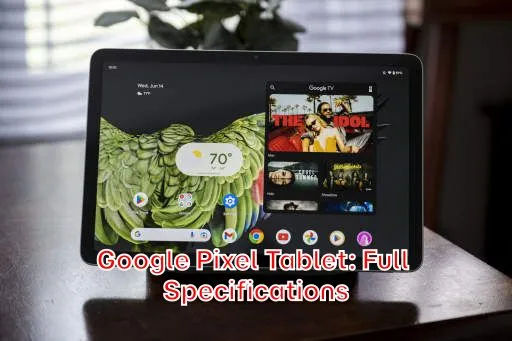
The Google Pixel Tablet is well-suited for families, offering features that cater to both adults and children. Its durable design and optional accessories, such as protective cases, can withstand the rigors of family life. The tablet’s parental controls allow you to restrict access to certain apps and websites, ensuring that your children are using the device safely and responsibly.
The tablet’s multiple user profile support allows each member of the family to have their own personalized experience, with their own apps, settings, and content. This prevents conflicts and ensures that everyone can use the tablet without interfering with each other’s preferences. The Pixel Tablet’s entertainment capabilities also make it a great device for family movie nights or for playing games together. The large display and powerful speakers provide an immersive entertainment experience for the whole family.
Furthermore, the tablet’s integration with Google Kids Space offers a safe and engaging environment for children to explore and learn. Google Kids Space provides access to a curated selection of apps, games, and videos that are designed for children of all ages. Parents can customize the content and set time limits to ensure that their children are using the tablet in a healthy and balanced way.
What Makes the Google Pixel Tablet Different from Other Tablets?
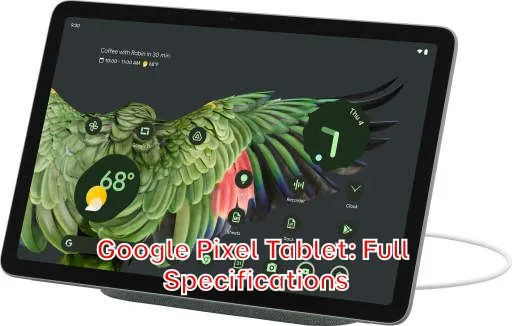
The Pixel Tablet distinguishes itself from other tablets through its unique combination of features, including its seamless integration with the Google ecosystem, its Charging Speaker Dock, and its focus on smart home control. While other tablets may offer similar specifications in terms of processing power and display quality, the Pixel Tablet’s tight integration with Google Assistant and its ability to seamlessly transition between a tablet and a smart display set it apart from the competition.
The Charging Speaker Dock is a key differentiator, transforming the tablet into a smart home hub that can be easily moved from room to room. This allows you to control your smart home devices, access information, and enjoy entertainment, all from a single device that’s always charged and ready to use. The tablet’s software experience is also a major advantage, with a clean and intuitive interface that’s optimized for both tablet and smart display use. The Pixel Tablet receives regular software updates directly from Google, ensuring that it always has the latest features and security patches.
In a market saturated with tablets, the Google Pixel Tablet offers a unique proposition by blending the functionality of a traditional tablet with the convenience of a smart home hub. Its seamless integration with the Google ecosystem, innovative design, and family-friendly features make it a compelling option for users who are looking for more than just a simple tablet.
